Go to Reports > Conversions log:
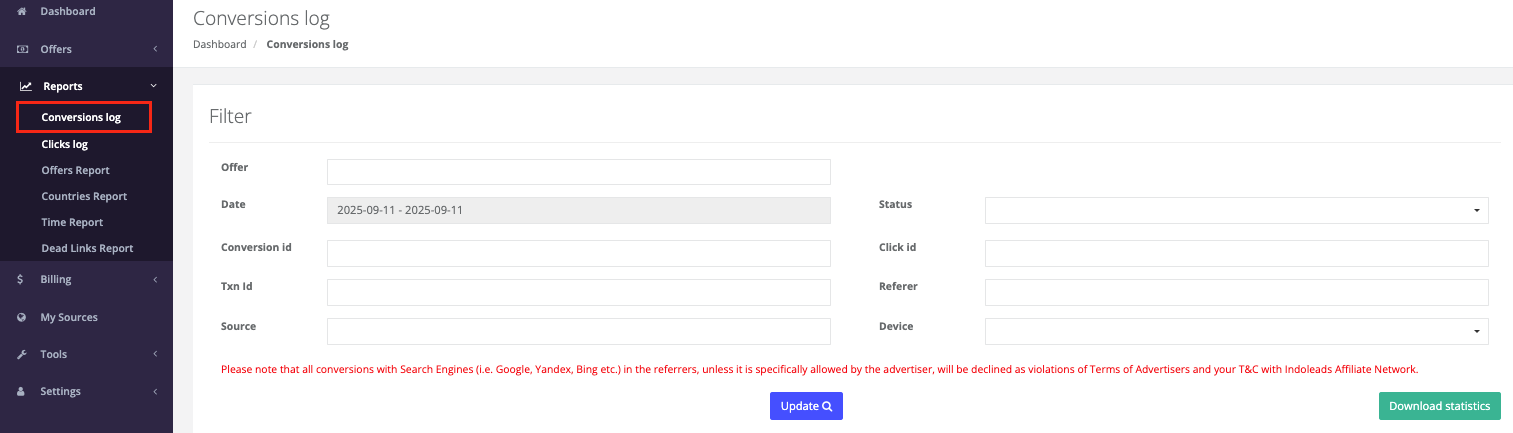
Here you can check for reconciliation of your conversion activity and missing conversions. Select the offer, the preferred date range, fill in other needed details and press Update:
Conversion ID - conversion ID of the record of any conversion, sale, goal etc.
Click ID - click ID generated by tracker.
Txn ID - unique transaction ID from advertiser.
Offer - name of the offer.
Conversion time - the logged time when conversion happened.
Click time - the logged time when click happened.
Referer - referring domain for the click event.
Sale amount - the tracked sale amount for the conversion.
Payout - the commission for the tracked conversion.
Status - the current status of the conversion.
Source - traffic source.
Device - the device from which the conversion was completed: tablet, desktop or mobile.
If you want to download the data, click on Download statistics. It will take some time to generate the report, and you will be notified by email when the report is ready:
Also, once the report is ready, you will see a new notification in the upper right corner of your screen near to the bell icon. You can click on the bell icon to see the notification:
Was this article helpful?
That’s Great!
Thank you for your feedback
Sorry! We couldn't be helpful
Thank you for your feedback
Feedback sent
We appreciate your effort and will try to fix the article